Quick answer: A marketing KPI calculator divides the relevant campaign totals, then applies the correct unit. CPM is spend per 1,000 impressions; CTR is clicks as a percentage of impressions; CPC, CPA and CPCV are costs per click, conversion and completed video view. ROAS compares attributed revenue with spend. Frequency needs deduplicated reach, while VCR needs a clearly defined video denominator.
First, check that inputs describe the same campaign, period and measurement basis.
The eight marketing KPI formulas
Use reported totals, not bid settings or targets. Spend and revenue need the same currency. Calculated performance does not establish how the platform billed the campaign.
| KPI | Formula | Unit |
|---|---|---|
| CPM | Spend ÷ impressions × 1,000 | Currency per 1,000 impressions |
| CTR | Clicks ÷ impressions × 100 | Percentage |
| CPC | Spend ÷ clicks | Currency per click |
| CPA | Spend ÷ conversions | Currency per conversion |
| ROAS | Revenue ÷ spend | Multiple |
| Frequency | Impressions ÷ deduplicated reach | Impressions per person |
| VCR | Video completions ÷ video starts × 100 | Percentage of starts |
| CPCV | Video spend ÷ video completions | Currency per completion |
Google documents the same core calculations for CTR, average CPC and average CPA. Keep “conversion” specific: a purchase, a qualified lead and a newsletter signup are different outcomes, even when all three appear in a conversions column.
The VCR formula above is the starts-based definition used by the Manual KPI Calculator. It is not a universal platform definition. Display & Video 360 defines its video completion rate using video impressions, and defines completed-view cost using the relevant cost total divided by complete views. Match the denominator and cost basis before comparing results. See Google’s video metric definitions.
A worked example for one video campaign
Suppose a fictional video campaign has the following finalized reporting totals. All financial values are USD, the conversions are purchases, and the reach figure covers the entire campaign reporting period.
| Input | Value |
|---|---|
| Spend | $2,400 |
| Impressions | 400,000 |
| Clicks | 4,000 |
| Purchases | 120 |
| Attributed purchase revenue | $12,000 |
| Deduplicated reach | 160,000 people |
| Video starts | 200,000 |
| Video completions | 120,000 |
The calculations are:
- CPM: $2,400 ÷ 400,000 × 1,000 = $6.00.
- CTR: 4,000 ÷ 400,000 × 100 = 1.00%.
- CPC: $2,400 ÷ 4,000 = $0.60.
- CPA: $2,400 ÷ 120 = $20.00 per purchase.
- ROAS: $12,000 ÷ $2,400 = 5.00x.
- Frequency: 400,000 ÷ 160,000 = 2.50.
- VCR: 120,000 ÷ 200,000 × 100 = 60.00%.
- CPCV: $2,400 ÷ 120,000 = $0.02.
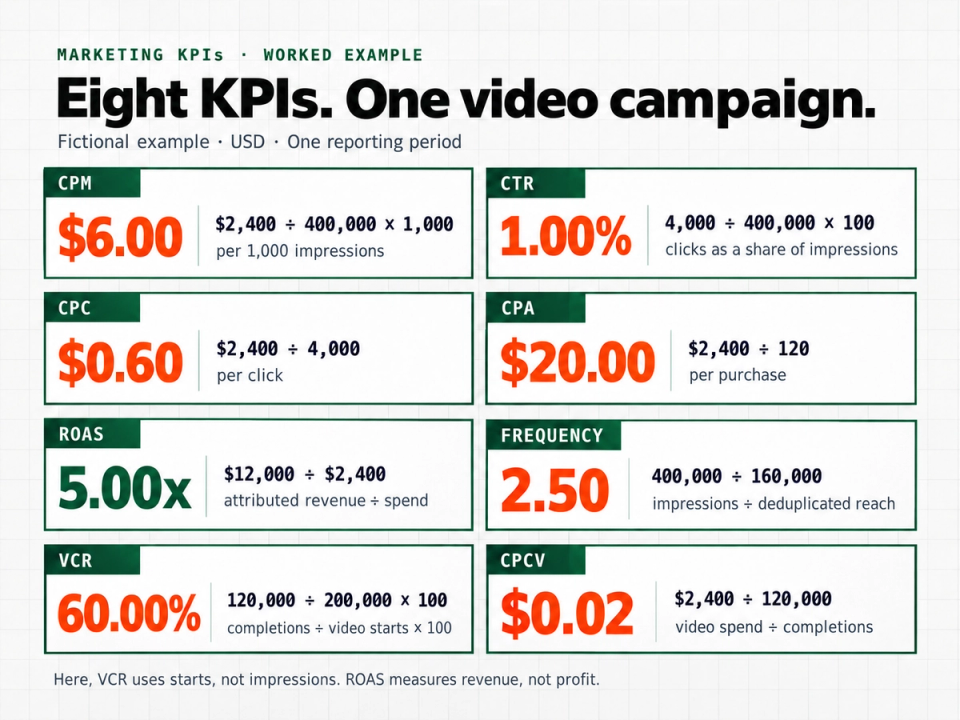
This campaign produced $5 of attributed revenue per $1 of advertising spend. Expressed as a percentage, 5.00x ROAS is 500%, not 5%. Google also distinguishes the conversion-value-to-cost ratio from its percentage expression. See the ROAS calculation guidance.
The 60% VCR says six out of ten recorded starts reached completion under this reporting definition. It does not say 60% of impressions completed: 120,000 completions divided by 400,000 impressions would be 30%. Both calculations can be arithmetically correct while answering different questions.
What the results can and cannot tell you
CPM describes delivery cost. It does not establish whether those impressions were viewable, relevant or incremental. CPC describes the cost of the selected click definition, not necessarily a website visit. Google notes that a click can be recorded even when the visitor never reaches the site. Read the click definition.
CPA and ROAS connect spend to recorded outcomes, but their meaning depends on attribution and conversion quality. A $20 cost per purchase may be acceptable or unacceptable depending on margin, repeat purchases and other costs. A 5.00x revenue-based ROAS is not a 5.00x profit return.
Frequency requires special care. The example uses one deduplicated campaign-period reach figure. Adding daily reach would count some people more than once and distort the denominator. Google’s reach methodology explicitly deduplicates audiences across sessions, formats, networks and devices. See how unique reach is calculated.
For CPCV, use spend for the same video activity that produced the completions. Dividing an entire mixed-media budget by completions from one video placement produces a different measure and needs a different label.
Handle missing inputs and zero denominators
An unavailable KPI is better than a misleading zero.
- Zero clicks with positive spend: CPC is undefined, not $0.
- Zero conversions: CPA is undefined. Report the spend and zero conversions alongside it.
- Zero revenue with positive spend: ROAS is genuinely 0x.
- Zero spend: ROAS is undefined, even if revenue is present.
- Missing reach or starts: Leave frequency or VCR unavailable rather than substituting impressions.
- Missing tracking: Do not replace an unknown conversion count with zero.
Unexpected relationships, such as more completions than starts, warrant checking definitions, reporting periods and mappings before interpreting performance. Keep full precision during calculation and round only the displayed result.
A reusable calculation checklist
Before calculating, record:
- Campaign or reporting scope and date range.
- Currency and spend basis, including whether fees are included.
- Click definition and conversion action.
- Attribution window and reporting extraction date.
- Revenue definition and any refunds or adjustments.
- Video denominator and matching video spend.
- Reach source and the period over which it was deduplicated.
- Missing inputs, zero denominators and any resulting unavailable KPIs.
For several rows, calculate ratios from compatible summed inputs, not averaged percentages or costs. Reach needs a deduplicated total, not a sum.
Download the KPI formula reference and worked example (.txt)
Frequently asked questions
Is there one good benchmark for these KPIs
No. Compare campaigns with similar objectives, formats, audiences, conversion definitions and reporting maturity. A low delivery cost alone does not establish business success.
Does a KPI calculator need every input
No. Each metric needs only its own inputs. Spend and impressions unlock CPM; revenue is unnecessary unless you want ROAS.
Can the calculator fix attribution or tracking errors
No. It calculates from the values supplied. Verify the reporting definitions and missing-data conditions before using the result to make a decision.
Calculate your campaign metrics
Open the Campaign Dashboard and Manual KPI Calculator, choose Try the Manual KPI Calculator, enter the inputs you have and select Calculate Metrics. No report upload is required for the manual calculator. Use the worked example above as a reference, then replace it with a clearly defined reporting scope.