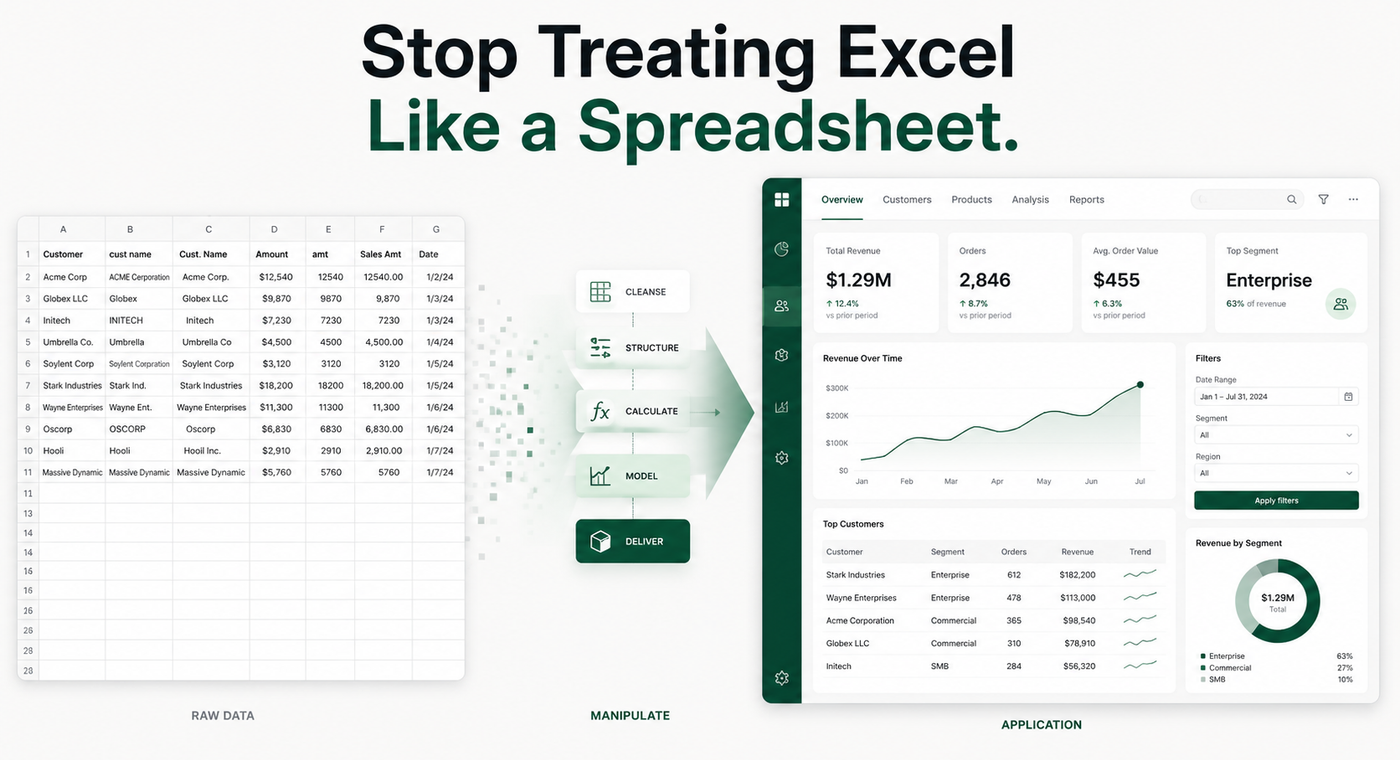
Stop Treating Excel Like a Spreadsheet
Excel can be an app.
Not metaphorically. Not in the sense that every spreadsheet is technically software.
I mean an actual working application.
Something with inputs. Rules. Controls. Calculations. Data transformation. Dynamic outputs. Visuals. Navigation. Error handling. And a clear purpose for the person using it.
Most of us were never taught to think about Excel this way.
We were taught to open a workbook, enter some data, write a few formulas, maybe build a pivot table, add a chart, and save the file.
That's useful.
But it barely scratches the surface of what Excel can become.
Once you stop thinking about cells and start thinking about systems, Excel changes completely.
A Spreadsheet Stores Data. An Application Does Something With It.
Think about the marketing platforms you use every day.
Google Ads takes campaign settings, budgets, audiences, creative, bids, performance data, and business rules and packages all of that into an interface you can actually use.
A DSP does the same thing.
A reporting platform does the same thing.
A CRM does the same thing.
Behind the interface is data.
The application gives that data structure.
It determines:
- what you can enter
- what happens to your inputs
- which calculations are performed
- what information is shown
- what information is hidden
- what actions you can take
- how the output is presented
Excel can do many of those same things on a smaller and much more customizable scale.
That doesn't mean Excel should replace your DSP, CRM, analytics platform, or database.
It means Excel can become the application layer between the data and the work you're actually trying to accomplish.
That's where things get interesting.
The Difference Starts With How You Build
A traditional workbook might look like this:
Sheet1
Sheet2
Final
Final Final
Final Final 2
We've all seen it.
Someone inherits the workbook six months later and has absolutely no idea what is happening.
An Excel application should be designed differently.
You might instead think in terms of:
HOME
INPUT
DATA
MAPPING
PERFORMANCE
OUTPUT
SETTINGS
Now you're designing a workflow.
The user doesn't need to understand every formula behind the scenes.
They need to understand what they should put in and what they're going to get out.
That is an application mindset.
The Hard Part Isn't Usually the Formula
This is where advanced Excel work becomes different from simply knowing a lot of functions.
A complicated formula can certainly be difficult.
But the hardest question is often:
What exactly are we trying to make happen?
Let's take advertising data.
Maybe I'm receiving performance files from several platforms.
One platform calls the field:
Campaign Name
Another uses:
Campaign
Another:
campaign_name
Another platform might structure campaigns differently altogether.
Before I can analyze anything, I need to decide that all of those fields represent the same concept.
Then I may need to standardize:
- campaign names
- channels
- dates
- currencies
- creative names
- impressions
- clicks
- spend
- video metrics
- conversions
- audiences
- geographic fields
Now I can start calculating things.
CTR.
CPM.
CPC.
CPA.
Pacing.
Budget remaining.
Performance against benchmark.
Only then do we get to the dashboard everybody wanted in the first place.
That middle part is what I call data manipulation.
And I think we seriously underestimate how important it is.
Analytics Gets the Attention. Data Manipulation Makes Analytics Possible.
Analytics asks:
What does this data tell me?
Data manipulation asks:
How do I make this data usable in the first place?
Before we can find a trend, somebody usually has to clean something.
Before we can compare performance, somebody has to standardize something.
Before we can build a dashboard, somebody has to determine which fields belong together.
Before a visualization becomes dynamic, somebody has to build the logic underneath it.
That work may involve:
Cleaning.
Mapping.
Combining.
Reshaping.
Validating.
Calculating.
Normalizing.
Transforming.
That's not the glamorous part of analytics.
But in a lot of real-world data work, that's where most of the thinking happens.
This Is Where Expertise Matters
You can't build a useful application just because you know Excel.
Knowing Excel gives you the tools.
It doesn't necessarily tell you what to build.
The strongest Excel applications usually sit at the intersection of several kinds of knowledge.
You need some understanding of technology.
You need to understand data.
You need to understand the business process.
And most importantly, you need to understand what matters to the people who will actually use the application.
For an advertising team, that might mean understanding:
- how campaigns are structured
- what a client expects to see
- which KPIs actually matter
- how budgets are managed
- how campaigns are named
- what different platforms export
- where mistakes commonly happen
- what information a trafficker needs
- what an analyst needs
- what an account manager needs
- what leadership needs
None of that comes from knowing SUMIFS.
It comes from understanding the work.
Then Excel becomes the place where you package all of that knowledge together.
Building This Way Takes Longer
There is a downside.
Building Excel like an application is usually more time-consuming at the beginning.
You have to think through the workflow.
You have to decide what users should and shouldn't be able to edit.
You have to structure your data properly.
You may need to create mappings.
Validation.
Error handling.
Reusable formulas.
Power Query transformations.
Dynamic arrays.
Named functions.
Navigation.
Visualizations.
You may spend significantly more time building the first version than you would have spent manually completing the task once.
But that's the wrong comparison.
The question isn't:
Would it have been faster to do this manually today?
The better question is:
How many times are we going to have to do this again?
Because once a strong system is built, it's built.
The next file goes in.
The transformations happen.
The calculations update.
The visuals change.
The outputs refresh.
The user makes a few selections instead of rebuilding the analysis.
That's when the upfront work starts paying for itself.
Build Once. Use Repeatedly.
Imagine receiving a weekly advertising report.
The manual approach might look like:
Download five files.
Open them.
Copy columns.
Rename headers.
Remove unnecessary fields.
Add formulas.
Create a pivot.
Update the chart.
Check the totals.
Format everything.
Send the report.
Then do it again next Tuesday.
An application approach looks different.
You build the transformation rules once.
You build the calculations once.
You build the dashboard once.
You build the interface once.
Next Tuesday:
Replace the data. Refresh. Review.
That's a completely different relationship with Excel.
You're no longer using the workbook to complete the task.
You're using the workbook to operate a system that completes the task.
Dynamic Doesn't Just Mean a Chart Changes
When people hear "dynamic Excel," they often think about a dashboard with dropdowns.
That's part of it.
But a truly dynamic workbook can react throughout the entire workflow.
Select a client and the appropriate campaigns appear.
Choose a channel and the relevant metrics change.
Import a new source file and the columns are mapped automatically.
Change a budget and pacing updates.
Add a campaign and the reporting structure expands.
Select a date range and the analysis recalculates.
Choose a different KPI and the visualization changes.
A well-designed application responds to the user.
That's what makes it feel different from a spreadsheet.
The Visual Is the Last Layer
I love a good dashboard.
But one mistake I see is starting with the dashboard.
What colors should the chart be?
Where should the KPI cards go?
Should we use a bar chart or a line chart?
Those questions matter eventually.
But a beautiful dashboard sitting on top of poorly structured data is still a bad system.
My preferred order is:
RAW DATA
↓
MANIPULATE
↓
ANALYZE
↓
VISUALIZE
↓
DECIDE
The visualization is there because someone needs to understand something.
The analysis exists because someone needs to answer something.
And both depend on having usable data underneath them.
Excel Is Also a Great Prototyping Environment
There's another reason I like building this way.
Sometimes you don't know whether an idea deserves a full software application.
Maybe an organization has a complicated process that should eventually become a custom web tool.
That's a big investment.
Before building software, you can model the workflow in Excel.
What information goes in?
What rules need to be applied?
What decisions need to happen?
What outputs are required?
Where are the exceptions?
What does the user actually need to see?
Building the Excel version forces you to answer those questions.
Sometimes Excel ends up being sufficient.
Sometimes the workbook becomes the blueprint for something larger.
Either way, you've learned how the application needs to work.
This Is What I Want to Explore Here
That's the direction I'm taking with this site.
Not Excel tricks for the sake of Excel tricks.
Not lists of 50 functions you should memorize.
I want to explore how you take real business problems and build applications around them.
Especially problems involving advertising, operations, reporting, analytics, and data.
We'll look at things like:
- application architecture
- data manipulation
- dynamic arrays
- advanced formulas
- lookup systems
LAMBDA- Power Query
- mapping tables
- validation
- dynamic visualization
- user-interface design
- reporting systems
- workflow automation
And, most importantly, we'll build actual things.
Media planning applications.
Campaign builders.
Performance analyzers.
Reporting tools.
Data normalization systems.
Operational dashboards.
Because I think the best way to learn advanced Excel isn't to memorize more formulas.
It's to build something that forces those formulas, transformations, structures, and decisions to work together.
That's when Excel stops feeling like a spreadsheet.
And starts feeling like an app.
This article was drafted with the assistance of AI and edited by Arvin Stewart to ensure clarity and accuracy.