Quick answer: Use Location Lookup to convert an address to latitude and longitude or turn coordinates back into location information. Choose Address → Coordinates for an address, or Coordinates → Location for an existing pair. Then check the format and compare the mapped point with the intended venue. Valid numbers can still identify the wrong place.
For campaign planning, this check is useful when preparing public venue maps or reviewing proposed store and event locations. It establishes what a point represents. It does not establish advertising reach, footfall, targeting accuracy, or out-of-home measurement quality.
Choose the right lookup direction
Address to coordinates starts with a place description and returns a geographic point. Coordinates to location, often called reverse geocoding, starts with a point and returns location information.
The Location Lookup tool offers both directions and credits OpenStreetMap contributors for its location data.
Before searching, decide what you need to represent: the venue as a whole, its public entrance, or a specific installation position. A single address may not settle that question. Keep the original address alongside the coordinates so someone reviewing the plan can compare them.
Check the coordinate format
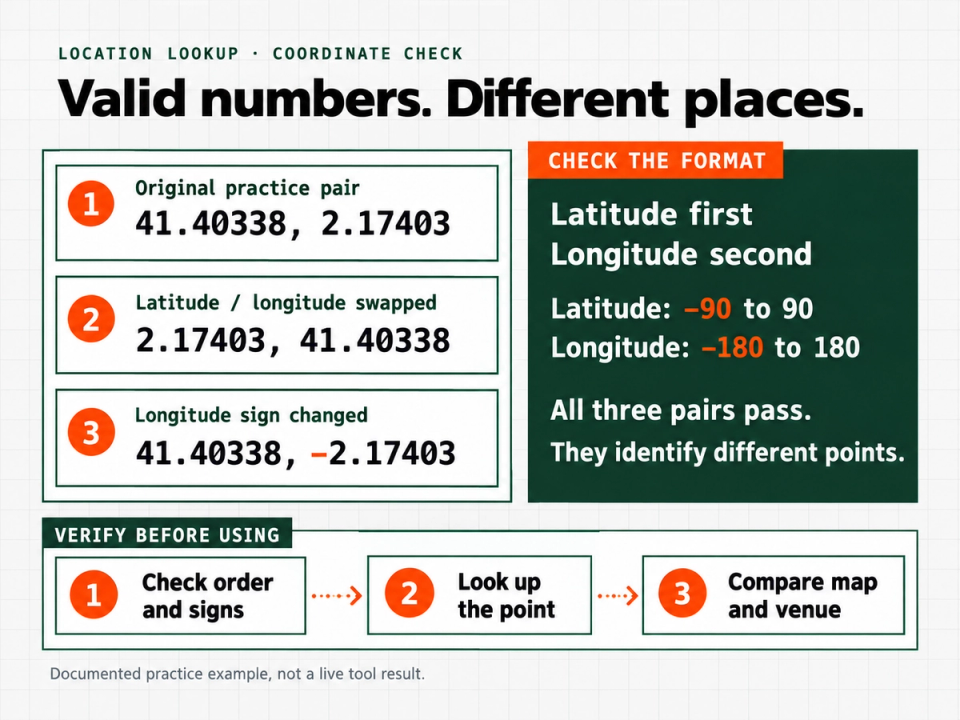
For decimal-degree entry in Google Maps, put latitude first and longitude second, separated by a comma. Latitude must be between −90 and 90; longitude must be between −180 and 180. Use a period as the decimal separator. These are Google's documented coordinate-entry conventions.
The signs matter:
- Positive latitude is north; negative latitude is south.
- Positive longitude is east; negative longitude is west.
The US Geological Survey documents this signed-coordinate convention.
Do not assume every receiving system uses the same field order. Read its column labels or import specification. In a planning sheet, separate Latitude and Longitude columns are less ambiguous than one unlabeled text field.
Work through a reproducible coordinate check
Google's help page supplies this practice pair:
41.40338, 2.17403It is a documented example, not a live result generated by the Location Lookup tool for this article.
- Enter
41.40338as latitude and2.17403as longitude in the tool's Coordinates → Location mode. - Run the lookup and read the returned location details.
- Search the same pair in a map and inspect the point.
- For a real campaign record, compare the point with the venue's published location and the position required by the brief.
Now consider two deliberate transcription errors:
| Input pair | What changed | Does it pass the numeric ranges |
|---|---|---|
| 41.40338, 2.17403 | Original practice pair | Yes |
| 2.17403, 41.40338 | Latitude and longitude swapped | Yes |
| 41.40338, -2.17403 | Longitude sign changed | Yes |
All three pairs fall within the allowed ranges, but they identify different points. That is why a range check cannot replace a map check.
If a supplier sends only a coordinate pair and a short venue name, ask what the pin represents before treating it as an approved location. Do not silently swap numbers until a result looks plausible.
Look up an address without accepting the first match blindly
For a public venue, start with the supplied street address, locality, postal code where relevant, and country. Choose Address → Coordinates, enter the address, and run the lookup.
Compare the returned details with the brief. A matching venue name is not enough if the city or street differs. When the result is ambiguous, add missing location context or return to the venue's official information.
Then inspect the map at two scales. Zoom out to confirm the broader area. Zoom in to judge whether the point represents the intended building or entrance. If the brief requires an exact installation position, obtain that position from the responsible site contact rather than inferring it from a general venue lookup.
Understand reverse lookup and precision limits
A reverse-geocoded address is supporting evidence, not proof of an exact match. For example, Nominatim's official documentation says its reverse lookup returns address information from the closest suitable OpenStreetMap object; in a dense area, that object can belong to a different street. This is a documented reverse-geocoding limitation, not a claim about which backend the tool uses.
Likewise, more decimal places do not establish better source accuracy. Google's geocoding documentation distinguishes street-address results, interpolated positions, geometric centers, and approximate results. The result type matters, not just how many digits appear.
Keep the supplied precision, but do not add digits or label a point “exact” without evidence. Record what you verified: for example, “building checked on map” is more useful than an unexplained “accurate.”
Reuse this location review template
Copy these fields into your planning notes or location sheet:
Venue or site name:
Original address:
Intended point type:
Latitude:
Longitude:
Coordinate source and lookup date:
Returned location description:
Map and venue information checked:
Unresolved discrepancy:
Decision: usable for stated purpose / needs review
Before accepting the point, confirm:
- Both coordinate fields are present and in range.
- Their order and signs match the source.
- The returned locality agrees with the intended venue.
- The point represents the position the brief needs.
- Any mismatch remains visible for review.
Keep that review focused on location identity. Approval of a venue pin should not be recorded as approval of a targeting configuration or a measurement methodology.
Download the location review worksheet (.txt)
Frequently asked questions
Can latitude and longitude be reversed without an error
Yes. If both numbers fit both ranges, a swapped pair can remain mathematically valid while pointing elsewhere.
Does reverse lookup confirm the exact street address
Not necessarily. The returned description depends on the underlying map objects and lookup behavior. Check the point against the intended site.
How many decimal places should a campaign plan use
Preserve the source values and follow the destination's requirements. Decimal places alone do not establish whether a point is suitable for your purpose.
Use Location Lookup to convert an address or inspect an existing coordinate pair, then verify the result before adding it to a campaign plan.