To use a campaign name generator, start with a short campaign concept, then add the channel, platform, audience or tactic, market, objective, and flight dates. Generate the name and copy the displayed result into your campaign brief. The important work is choosing clear field values before combining them.
This guide uses a fictional reporting-workshop campaign to show the decisions step by step. Open the Campaign Naming Generator to follow along.
Turn the brief into a naming recipe
Suppose your brief says:
Promote a reporting workshop to operations managers in the United States through paid LinkedIn activity. The objective is workshop registrations. Run it from March 2 through March 20, 2027.
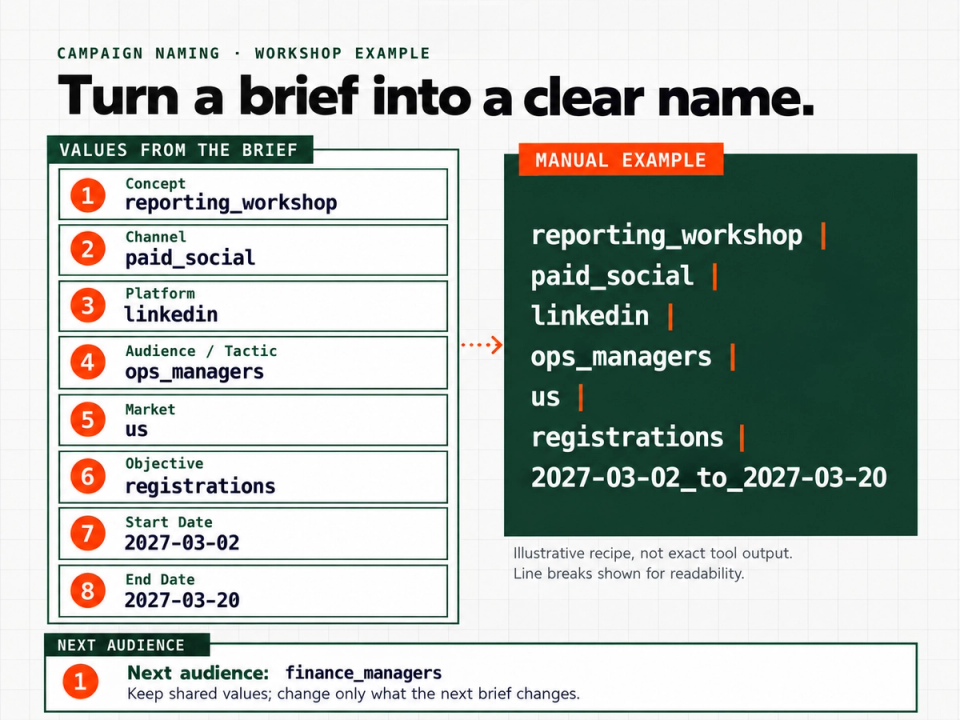
That sentence contains almost everything needed for a useful name. Extract the facts instead of trying to invent a clever title:
| Field | Suggested value | Decision behind it |
|---|---|---|
| Concept / Campaign Name | reporting_workshop | The offer being promoted |
| Channel | paid_social | The distribution category |
| Platform | Where the activity runs | |
| Audience / Tactic | ops_managers | Who this campaign addresses |
| Market | us | The intended market |
| Objective | registrations | The desired action |
| Start Date | 2027-03-02 | The beginning of the flight |
| End Date | 2027-03-20 | The end of the flight |
These are proposed labels for this example, not mandatory vocabulary. If your team already calls the audience operations_managers, use that wording rather than introducing a shorter synonym just for this campaign.
The generator provides these fields, including start and end dates entered as YYYY-MM-DD.
Choose values that answer different questions
The concept should identify the offer, not repeat the channel. reporting_workshop leaves room for the same offer to run through another distribution method later.
Keep channel and platform distinct in your worksheet. In this recipe, paid_social answers “what type of activity?” and linkedin answers “where?” You can then create a second version for another platform without rewriting the concept.
For audience or tactic, choose the distinction that will help someone recognize this particular campaign. Our example uses the audience. A different brief might call for remarketing instead. Avoid squeezing an audience, tactic, offer, and creative description into that one field.
Use a concrete objective. registrations is more informative for this workshop than growth. These labels describe the plan; they do not claim that the campaign will achieve a particular result.
Remove details that belong elsewhere
Do not add the owner's name, a meeting date, a budget note, or the phrase final_final simply because those details appear in the planning document. Keep the complete brief nearby and put only the chosen naming dimensions into the name.
A useful test is to ask whether a field helps distinguish this campaign from the next one you are likely to create. If a detail merely records who edited the brief, leave it in the brief.
Generate the name from the completed fields
Select Build Name, enter the values, and choose an available major-field delimiter. Then select Generate Name and use Copy for the displayed result. The tool also provides Reset.
A delimiter separates the major pieces of a name. For a manual worksheet, a readable convention could be:
concept | channel | platform | audience | market | objective | start_to_endApplying the example gives this suggested, manually assembled name:
reporting_workshop | paid_social | linkedin | ops_managers | us | registrations | 2027-03-02_to_2027-03-20This illustrates a naming recipe, not the generator's exact output format. When using the tool, copy its displayed result rather than assuming it follows this manual template's field order or date formatting.
Keep the field values beside the copied name so the brief explains unfamiliar labels.
Adapt the recipe for the next campaign
Now imagine a second workshop promotion aimed at finance managers. Keep the shared values and change the audience to finance_managers. If its dates differ, update those too.
Keep the concept label unless the offer changes.
For a different market, change us to the market label your team uses. For a different objective, decide whether the brief really describes the same activity before simply swapping the word. These are planning decisions; a generator can combine the entries, but it cannot decide what the campaign is intended to do.
Copy this campaign naming worksheet
Use this template outside the tool whenever you need to prepare another name:
Plain-language campaign brief:

Concept / Campaign Name:
Channel:
Platform:
Audience / Tactic:
Market:
Objective:
Start Date (YYYY-MM-DD):
End Date (YYYY-MM-DD):

Chosen major-field delimiter:
Copied generated name:

Before using the name
[ ] Each field answers one clear question.
[ ] Labels use the wording already used in the brief.
[ ] Dates reflect the planned flight.
[ ] The copied name is stored beside its field values.
[ ] No recipient's personal information is included.
Download the campaign naming worksheet (.txt)
If you later use the name in utm_campaign, preserve the chosen spelling and capitalization: Google Analytics treats differently capitalized parameter values as different values. Google's manual campaign-tagging documentation. Keep names, email addresses, phone numbers, and other personal information out of URL campaign fields. Google Analytics PII guidance.
Frequently asked questions
Is there one correct campaign naming convention?
No single recipe fits every brief. The example here is a practical starting point. Choose labels that distinguish the campaigns you actually run, then reuse that vocabulary when preparing related names.
Can I break an existing name into fields?
The tool includes Parse Name. Review its detected, suggested and unassigned fields rather than assuming an arbitrary convention was interpreted correctly. It also provides Flight Dates for a parsed name containing MMDD-MMDD dates without a year. Keep the original campaign brief available when interpreting those dates.
Should I put every creative detail in the campaign name?
For this recipe, no. Keep headline variations and individual button descriptions in the creative brief. Add a detail to the campaign name only when it distinguishes the campaign itself, rather than one asset within it.
Generate a name for your next brief
Start with one sentence describing the offer, audience, market, objective, and dates. Turn it into the worksheet values, then use the Campaign Naming Generator to generate and copy the result. You will have both a usable name and the decisions that explain it.